
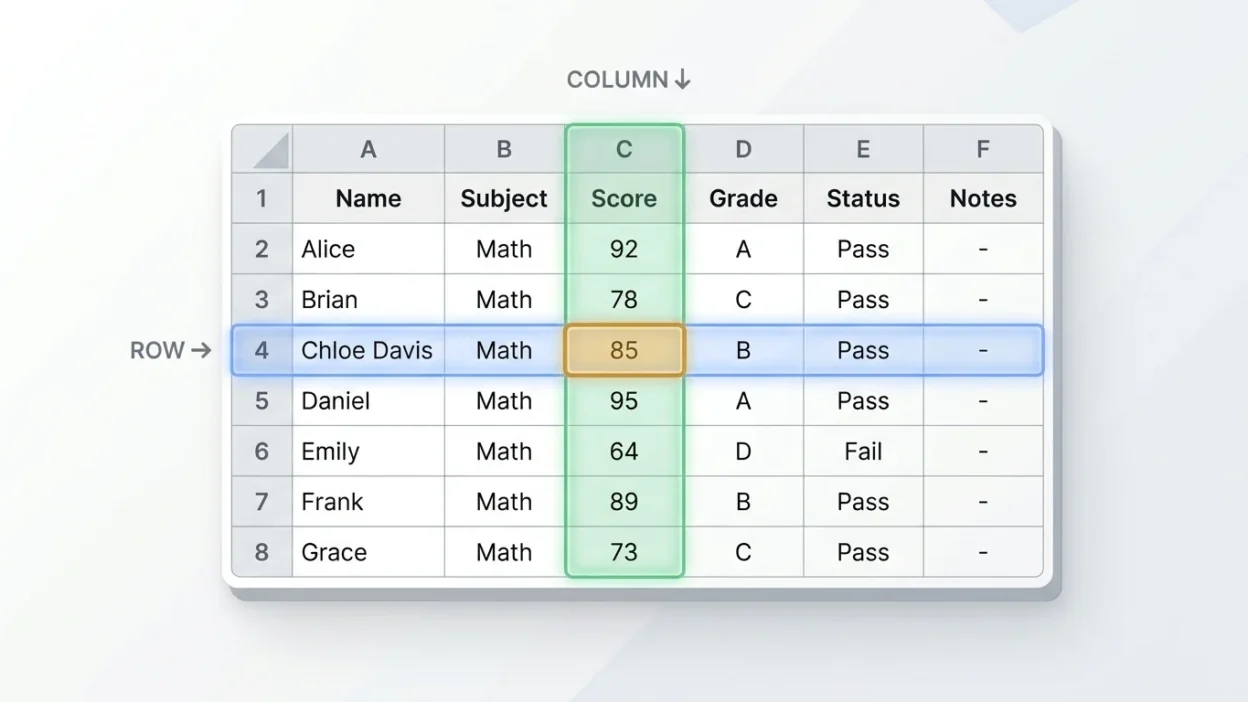
Understanding the difference between a row and a column is essential when working with tables, spreadsheets, databases, charts, and documents. Although these two terms are often used together, they describe different ways of organizing information. A row runs horizontally from left to right, while a column runs vertically from top to bottom. Knowing this simple distinction makes it easier to read data, organize records, and use spreadsheet applications such as Microsoft Excel and Google Sheets.
Rows and columns help arrange information into a clear grid. Each position in the grid is called a cell, where a row and a column meet. For example, a school timetable may use rows for different days and columns for subjects. In another table, rows might represent students while columns display their names, ages, and grades. The purpose of this guide is to explain row vs column with simple definitions, practical examples, common mistakes, and easy memory tricks.
Quick Answer: Row vs Column
A row is a horizontal arrangement of information that moves from left to right. A column is a vertical arrangement that moves from top to bottom. In a spreadsheet, rows are usually identified by numbers, while columns are identified by letters. Rows and columns intersect to create individual cells.
Why Do People Confuse Row and Column?
People often confuse rows and columns because both organize information in a grid. They also intersect, making it difficult for beginners to remember which direction each one follows.
Another reason is that their appearance depends on how a table is designed. A person may focus on the information rather than its direction and accidentally call a row a column.
For example, consider a student information table:
- A horizontal line containing one student’s details is a row.
- A vertical line containing information about every student’s age is a column.
The easiest way to avoid confusion is to remember their directions: rows go across, and columns go down.
What Is a Row?
A row is a horizontal group of cells, values, or items arranged side by side. It extends from left to right across a table, spreadsheet, or other grid.
Rows are commonly used to represent individual records or entries. For example, in a student database, each row might contain information about one student.
Examples of Rows
- In a school table, one row can contain a student’s name, age, and grade.
- In a spreadsheet, row 5 contains all the cells positioned across the fifth horizontal line.
- In a timetable, one row might represent Monday’s schedule.
- In a database, one row can store one customer’s complete record.
How Are Rows Used in Excel?
In Microsoft Excel and Google Sheets, rows are identified by numbers such as 1, 2, 3, and 4. These numbers appear along the left side of the worksheet.
For example:
- Row 1 contains the first horizontal set of cells.
- Row 2 contains the second horizontal set of cells.
- Row 10 contains all cells across the tenth row.
If you select an entire row, you select every cell across that horizontal line.
What Is a Column?
A column is a vertical group of cells, values, or items arranged one below another. It extends from top to bottom in a table, spreadsheet, or grid.
Columns often represent categories or types of information. For example, a student database might have separate columns for names, ages, grades, and addresses.
Examples of Columns
- In a school table, one column can display the names of all students.
- In a spreadsheet, column B contains all cells in the second vertical section.
- In a timetable, one column might represent mathematics lessons.
- In a customer database, one column can store email addresses.
How Are Columns Used in Excel?
In Microsoft Excel and Google Sheets, columns are identified by letters such as A, B, C, and D. These letters appear across the top of the worksheet.
For example:
- Column A is the first vertical section.
- Column B is the second vertical section.
- Column C is the third vertical section.
- Column Z is followed by column AA.
Selecting a complete column means selecting every cell from top to bottom in that vertical section.
Row vs Column: Key Differences
The main difference between a row and a column is their direction. A row moves horizontally, while a column moves vertically. They also differ in how they are labeled and how information is commonly organized.
| Feature | Row | Column |
|---|---|---|
| Direction | Horizontal | Vertical |
| Movement | Left to right | Top to bottom |
| Shape | Long horizontal arrangement | Long vertical arrangement |
| Excel identification | Numbers | Letters |
| Position in Excel | Numbered on the left | Lettered at the top |
| Common purpose | Organizing individual records | Organizing information by category |
| Example | One student’s complete record | All students’ names |
| Intersection | Meets a column at a cell | Meets a row at a cell |
When Should You Use a Row or Column?
The choice between a row and a column depends on the type of information you want to organize and how people will use it.
When to Use a Row
Use rows when you want to organize complete records or individual entries.
For example, a teacher creating a student list can place each student’s information in a separate row. Each row may include the student’s name, age, grade, and attendance status.
Rows are useful for:
- Recording individual students or employees.
- Listing products and their details.
- Organizing daily sales records.
- Storing customer information.
- Displaying individual transactions.
When to Use a Column
Use columns when you want to organize similar types of information together.
For example, a teacher can create separate columns for student names, ages, grades, and attendance. This makes it easier to compare one type of information across multiple records.
Columns are useful for:
- Organizing names and contact details.
- Recording prices and quantities.
- Comparing student grades.
- Storing dates and categories.
- Grouping similar information for analysis.
12 Simple Examples of Rows and Columns
The following examples show how rows and columns work in everyday situations.
Example 1: Student Information
A student information table may have one row for each student and separate columns for name, age, and grade.
Example 2: School Timetable
Each row may represent a day of the week, while each column represents a subject or class period.
Example 3: Monthly Expenses
Each row can represent an expense, while columns show the date, expense category, and amount.
Example 4: Employee Records
Each employee can have one row containing their name, job title, department, and salary.
Example 5: Product Inventory
Each row can represent one product, while columns display its name, price, quantity, and product code.
Example 6: Customer Database
Each customer can occupy one row, while columns store their contact information and account details.
Example 7: Sports Statistics
Each row can represent a player, while columns show games played, goals, assists, or points.
Example 8: Restaurant Menu
Each row can represent a menu item, while columns display the item name, category, and price.
Example 9: Attendance Sheet
Each row can represent a student, while columns show different school days or attendance details.
Example 10: Sales Report
Each row can represent a sale, while columns display the product, date, salesperson, and total amount.
Example 11: Library Records
Each row can represent a book, while columns contain its title, author, publication year, and category.
Example 12: Online Survey
Each row can represent one participant’s response, while columns contain individual survey questions.
Common Mistakes When Using Rows and Columns
Beginners sometimes make simple mistakes when working with tables and spreadsheets. Understanding these errors can help you organize information correctly.
1. Mixing up horizontal and vertical directions
A row is horizontal, not vertical. A column is vertical, not horizontal.
2. Thinking rows and columns are the same
Both organize information, but they follow different directions and may serve different purposes.
3. Confusing Excel row numbers with column letters
Excel uses numbers for rows and letters for columns. For example, row 4 and column D are different parts of the worksheet.
4. Misunderstanding a cell reference
A cell reference combines a column letter and a row number. For example, B3 means column B and row 3.
5. Choosing the wrong layout
Putting every record into a separate column instead of a separate row can make a table harder to read and analyze. Choose a consistent structure that matches your data.
Easy Memory Trick: How to Remember Row vs Column
You can remember the difference between rows and columns with two simple tricks.
- Row = Road: Imagine a road running horizontally from left to right.
- Column = Pillar: Imagine a building pillar standing vertically from top to bottom.
Another useful trick is to remember that spreadsheet rows have numbers on the left, while columns have letters at the top.
If you remember that rows go across and columns go down, you can identify them easily in almost any table.
Row vs Column in American and British English
The words row and column have the same basic meanings in American and British English. Both varieties use row for a horizontal arrangement and column for a vertical arrangement in tables and spreadsheets.
There are some differences in everyday usage. For example, people may use row to describe a line of seats in a classroom or theater. The word column can also describe a vertical section in a newspaper or magazine.
However, these regional differences do not change the basic distinction:
- Row means a horizontal arrangement.
- Column means a vertical arrangement.
Both terms are understood in American and British English.
Similar Words Related to Rows and Columns
Several other words are connected to rows and columns. Understanding them can make it easier to work with tables, spreadsheets, and databases.
| Word | Meaning |
|---|---|
| Cell | A single box where a row and column intersect |
| Table | Information organized into rows and columns |
| Grid | A structure made of intersecting horizontal and vertical lines |
| Record | A complete set of related information, often stored in a database row |
| Field | A specific category of information, often represented by a database column |
| Spreadsheet | A digital document used to organize and calculate data |
| Header | A label that identifies a row or column |
| Dataset | A collection of related information |
Final Verdict: Row vs Column
The difference between a row and a column is simple: a row runs horizontally from left to right, while a column runs vertically from top to bottom. Both are important for organizing information in tables, spreadsheets, and databases.
Rows commonly hold individual records, while columns organize specific categories of information. In Excel, rows are identified by numbers and columns by letters. Remembering these basic differences will help you read tables, manage spreadsheets, and understand data more confidently.
FAQs
1. What is the main difference between a row and a column?
A row is a horizontal arrangement of information, while a column is a vertical arrangement. Rows move from left to right, and columns move from top to bottom.
2. Is a row horizontal or vertical?
A row is horizontal. It extends from left to right across a table, spreadsheet, or grid.
3. Is a column horizontal or vertical?
A column is vertical. It extends from top to bottom and contains items arranged one below another.
4. Are rows numbers and columns letters in Excel?
Yes. Excel identifies rows using numbers such as 1, 2, and 3. It identifies columns using letters such as A, B, and C.
5. What is a cell in a spreadsheet?
A cell is a single box formed where a row and a column intersect. For example, B3 refers to the cell in column B and row 3.
6. Which is better for organizing data, rows or columns?
Neither is always better. Rows are useful for organizing individual records, while columns are useful for grouping similar information. Most well-structured tables use both.
7. How can I quickly remember row and column?
Remember that a row runs like a road from left to right, while a column stands like a pillar from top to bottom.
Remember This
- A row goes horizontally from left to right.
- A column goes vertically from top to bottom.
- Rows usually contain individual records.
- Columns usually contain categories of information.
- Excel uses numbers for rows and letters for columns.
- A cell is where a row and column meet.
Conclusion
Understanding row vs column makes working with tables, spreadsheets, and databases much easier. Although both terms describe ways of arranging information, their directions are different. A row moves horizontally, while a column moves vertically. Once you understand this basic distinction, you can recognize them quickly in almost any grid.
Whether you are organizing school records, preparing a sales report, managing customer details, or learning Microsoft Excel, rows and columns help keep information clear and organized. Remember the simple rule: rows go across, and columns go down. This small distinction can make a big difference when working with data.

William Noah is a spiritual writer at BibLoft, exploring hidden meanings, symbols, and divine insights. He shares thoughtful interpretations that inspire self-awareness, inner growth, and spiritual understanding.